
Repository Rules, Context, and Validation
Repository rules make MergeLoom predictable. They tell the selected execution path how to understand the repository, related services, allowed commands, and what must pass before a PR or MR reaches review.
This Is Configured in the Customer Controller
Set repository and system context, run rules, validation commands, and Quality Agent
controls in https://controller.mergeloom.ai. MergeLoom uses
those rules when it runs the job through Cloud Hosted or Self Hosted
execution.
What to Configure First
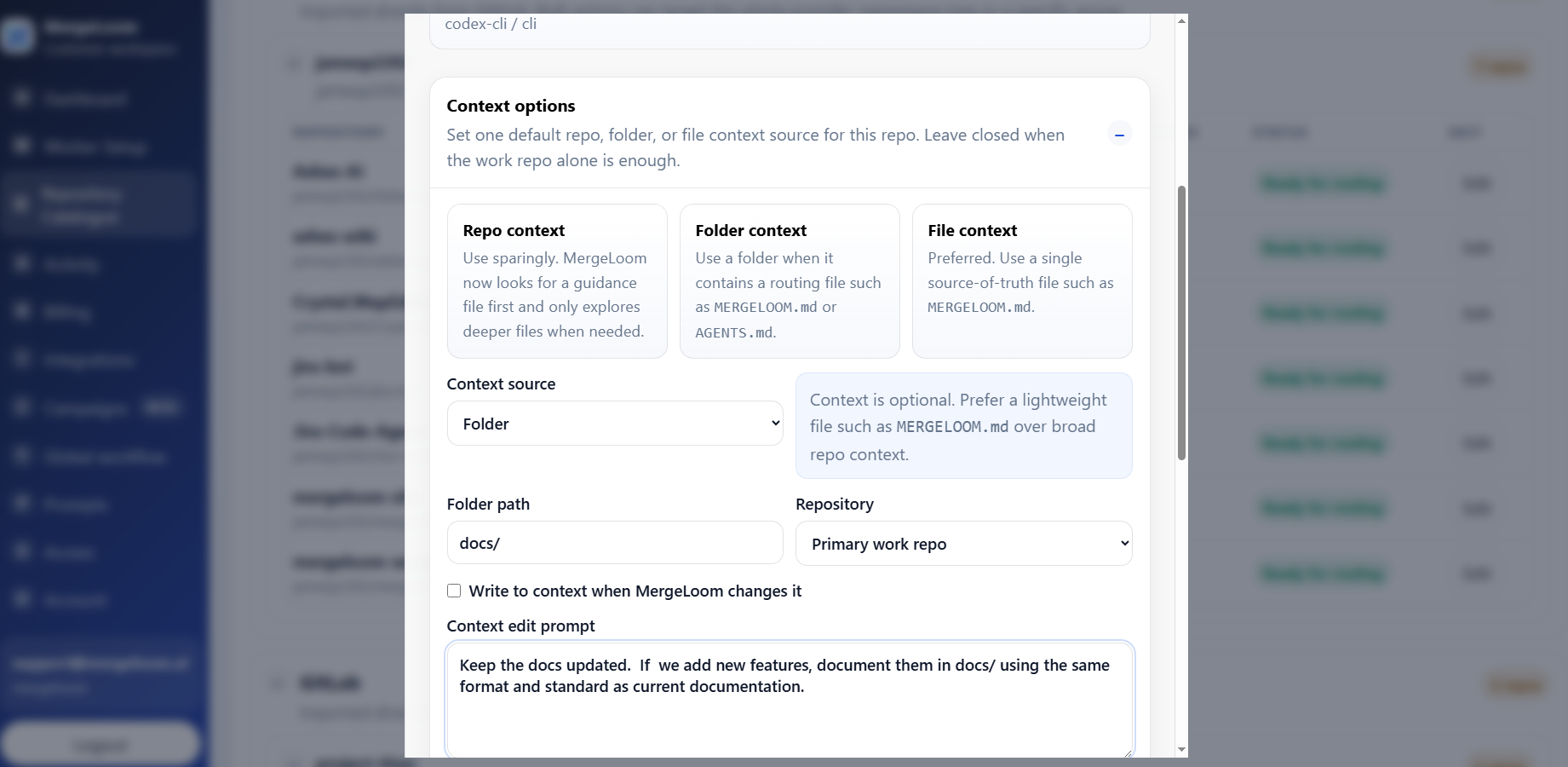
Section titled “What to Configure First”For each work repository, configure:
- repository alias
- default branch
- context rules
- setup commands
- validation commands
- provider/model defaults if needed
- Quality Agent and diff guard settings
Context Rules
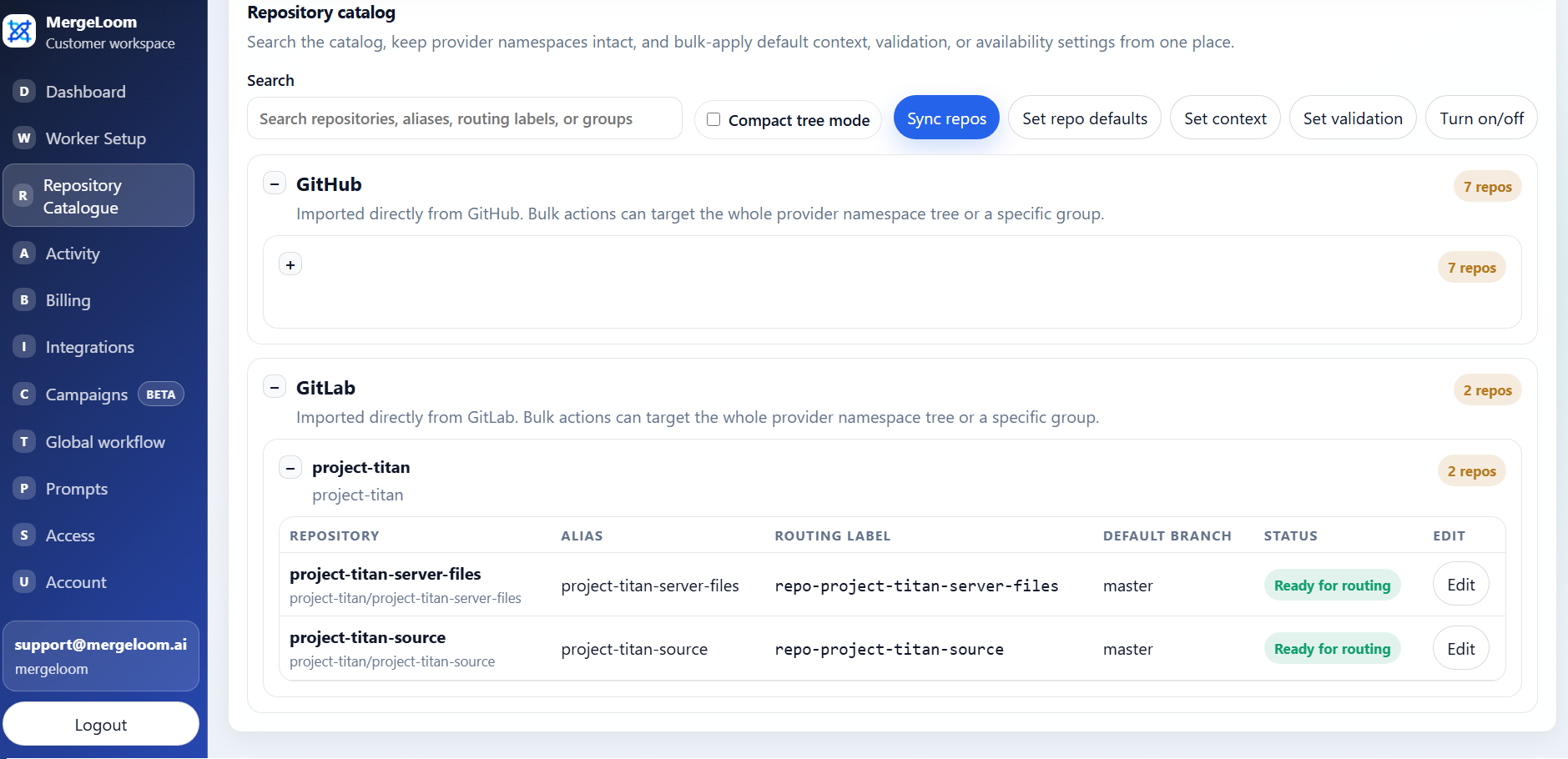
Section titled “Context Rules”Context rules should include the information a good engineer would want before changing the repository:
- architecture notes
- coding standards
- test strategy
- module ownership
- migration rules
- API compatibility rules
- files or folders that should be read first
Keep context direct. Good context reduces bad AI output more than long generic instructions.
For repository or folder context sources, MergeLoom looks for a routing guidance file before relying on broad content injection. Prefer a short MERGELOOM.md, then AGENTS.md, to point the worker at the smallest useful set of files.
Ticket-specific context directives belong in the ticket description inside a [JCA]...[/JCA] block:
[JCA]work_repos=apicontext_repos=shared-docscontext_files=api:MERGELOOM.mdinline_context=Use the existing retry policy from the billing service.[/JCA]Directive errors are visible on the job detail or audit surfaces. Use directives sparingly; repository catalog defaults are easier to govern.
Validation Commands
Section titled “Validation Commands”Start with the commands your team already trusts.
Examples:
pytestnpm testnpm run lintnpm run typecheckdotnet testMergeLoom can run setup, unit, integration, regression, or custom validation commands depending on the repository.
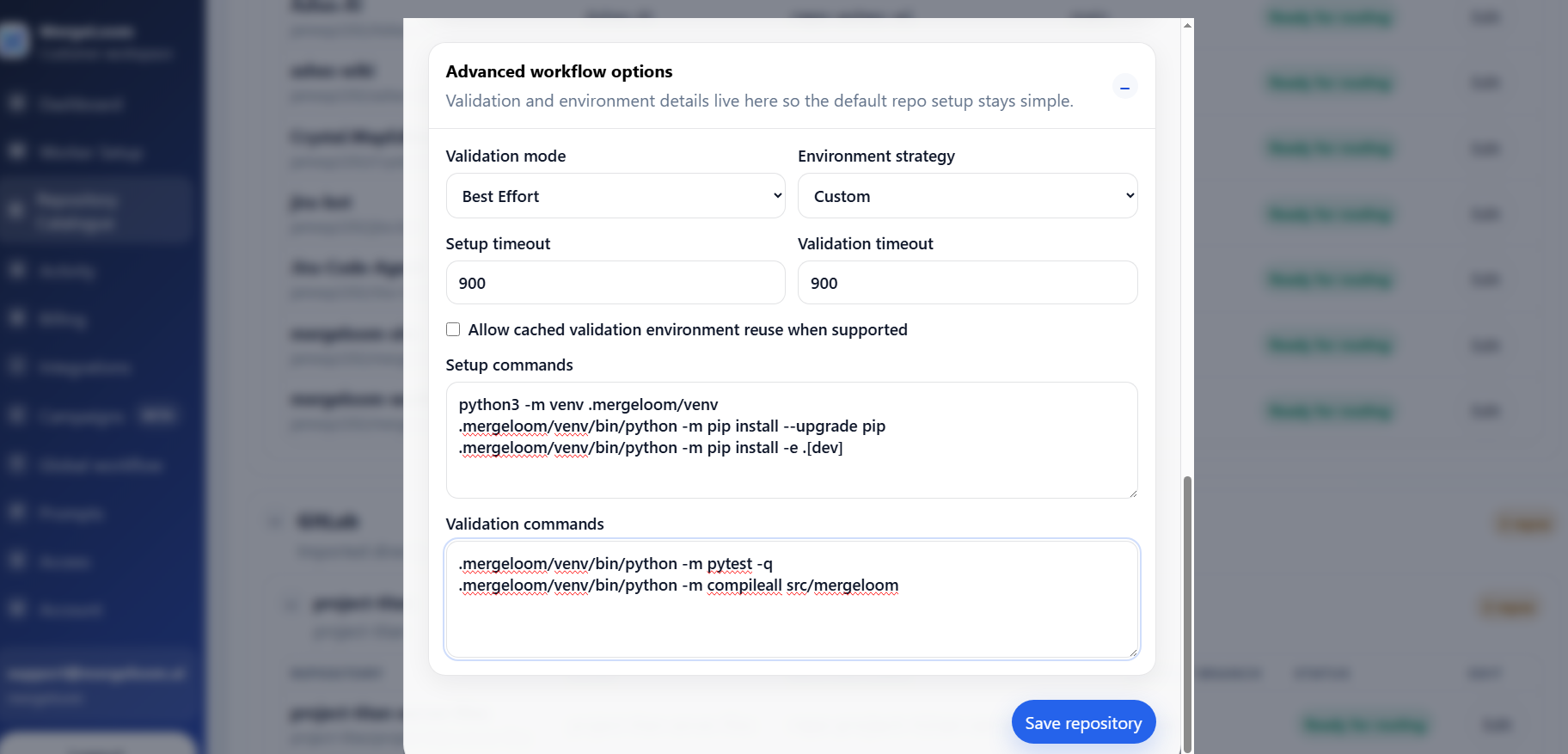
In the repository catalog, configure:
- validation mode: Off, Advisory, or Required
- setup commands, one command per line
- validation commands, one command per line
MergeLoom currently runs exactly the commands configured for the repository. Environment strategy is internal and defaults to the custom command path.
Allowed Commands
Section titled “Allowed Commands”Allowed commands are worker or platform policy, not a repository catalog field. Repository validation commands only work when the command name is allowed by the worker runtime.
The worker default allows common development tools. Review it for your runtime instead of assuming every repository command is allowed.
JCA_WORKER_ALLOWED_COMMANDS=git,rg,pytest,python,python3,node,npm,npx,pnpm,yarn,uv,pip,poetry,bash,sh,go,cargo,dotnet,helmFor Docker Compose installs, this value lives in the worker .env file next to
docker-compose.yml. Edit .env, then recreate the containers so the worker
loads the new environment value:
docker compose up -d --remove-orphans --force-recreateFor Helm installs, set worker.allowedCommands in your Helm values or with
--set, then upgrade the release so Kubernetes rolls the gateway and executor
pods:
helm upgrade mergeloom-worker oci://registry-1.docker.io/mergeloom/mergeloom-worker \ --namespace mergeloom \ --set worker.allowedCommands="git,rg,pytest,python,python3,npm,pnpm"Update the allowed commands before expecting the worker to run commands such as:
npmpnpmyarnuvdotnetgocargomake
Keep the list narrow enough to be defensible, but broad enough for real
validation. If a validation command uses npm, pnpm, uv, make, or another
tool, that tool must be present in JCA_WORKER_ALLOWED_COMMANDS and available
inside the worker container.
For Cloud Hosted, allowed commands are controlled by MergeLoom platform policy. For Self Hosted, your worker deployment controls the allowlist.
Quality Agent Controls
Section titled “Quality Agent Controls”Use Quality Agent controls to reduce weak AI output before a human reviewer spends time.
Recommended controls:
- Clarity Agent for ticket scoring
- Investigation Agent for a read-only implementation brief
- agent review pass
- diff guard
- max line-count warning
- validation before review
- clear run trail
The goal is not to remove human review. The goal is to make the PR or MR easier to review.
Quality Agent settings live in Workflow because they control the run path across repositories. Repository validation commands live in Repository catalog because they are repository-specific.
See Workflow and Quality Agents.
Preventing Vibe Coding
Section titled “Preventing Vibe Coding”Inconsistent AI coding is a real organizational risk when every developer uses different instructions, different context, and a different validation bar.
MergeLoom reduces that risk by applying:
- the same organization rules
- the same repository rules
- the same validation commands
- the same Quality Agent controls
- the same workflow path
That makes AI coding more repeatable, testable, and auditable.