
Install the Self Hosted MergeLoom Worker
The Self Hosted MergeLoom worker runs the AI coding execution path inside your environment: checkout, context assembly, model execution, validation, repair attempts, and branch push.
Use this guide only when you choose Self Hosted. Cloud Hosted runs on MergeLoom-managed cloud workers and does not require Docker Compose, Helm, or worker enrollment.
For first-run testing, Docker Compose is the recommended path. Use Helm when you are ready to run the worker in Kubernetes.
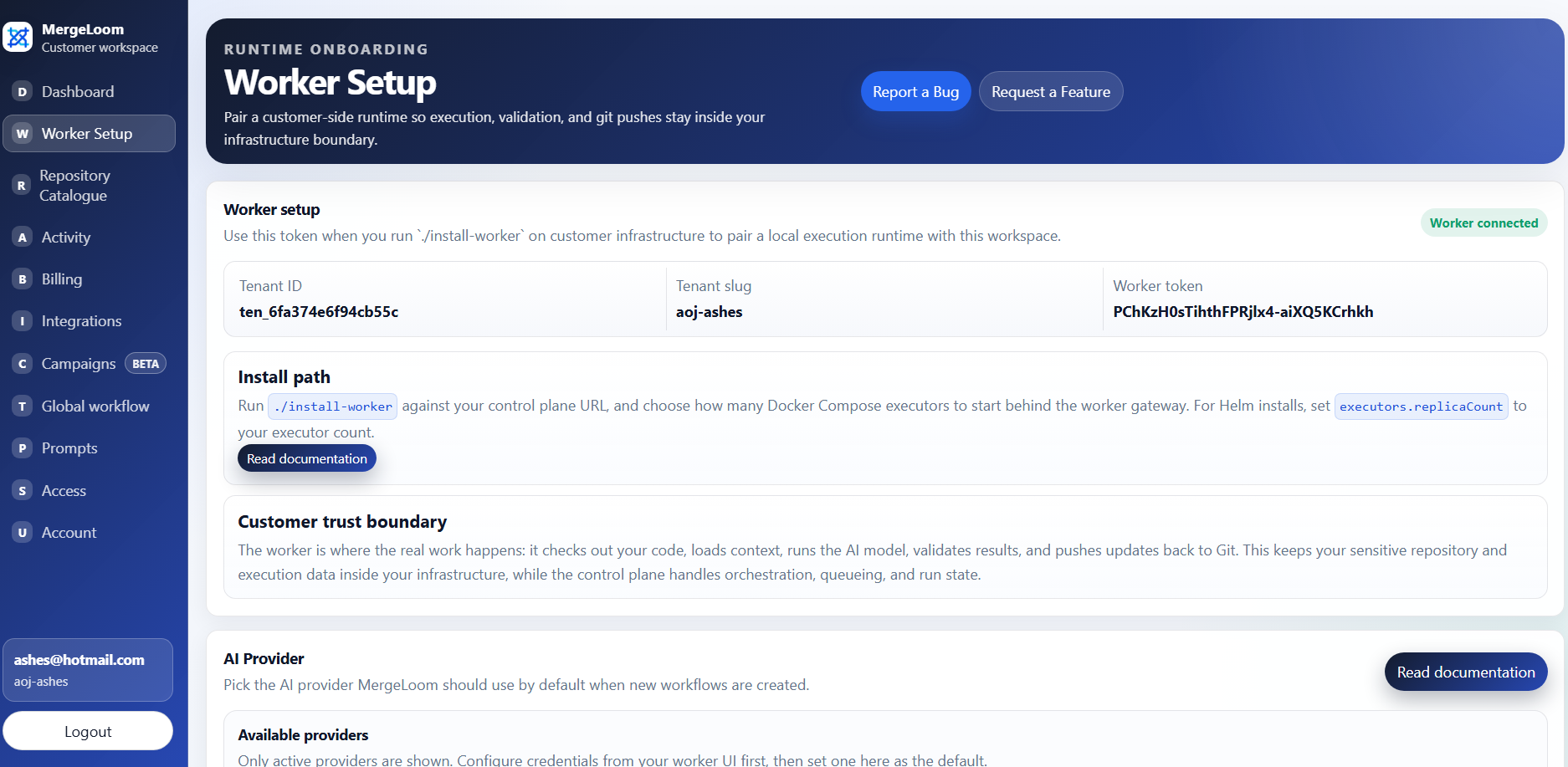
Start in the Customer Controller
Worker enrollment values come from the customer controller at
https://controller.mergeloom.ai. The local worker UI is only
available after the worker is installed.
Choose an Install Path
Section titled “Choose an Install Path”| Path | Use it when | Current status |
|---|---|---|
| Docker Compose | You want the fastest first run on a Linux host or VPS. | Public installer: MergeLoom/mergeloom-worker-install. |
| Helm | You want the worker in Kubernetes. | Public chart: MergeLoom/mergeloom-worker-helm-chart. |
| Manual container run | You need custom orchestration. | Use the public Compose or Helm install as the reference. |
Docker Compose Install
Section titled “Docker Compose Install”From the public worker Compose installer repository:
git clone https://github.com/MergeLoom/mergeloom-worker-install.gitcd mergeloom-worker-install./install.shThe first run creates .env from .env.example and stops so you can set the customer values:
JCA_WORKER_CONTROL_PLANE_URL=https://controller.mergeloom.aiJCA_WORKER_TENANT_SLUG=customer-slugJCA_WORKER_ENROLLMENT_TOKEN=replace-meJCA_WORKER_NAME=worker-customerThen run the installer again:
./install.shThe installer runs the Compose pull and start commands for you. If you need to do the same steps manually:
cp .env.example .envdocker compose pulldocker compose up -dIt starts:
- one worker gateway
- one worker executor
For production capacity, keep one gateway and scale executors. The gateway owns configuration and local UI state; executor replicas pick up jobs and run them. Your plan and worker settings still control how many jobs can run at once.
The gateway owns:
- worker UI
- provider setup
- local provider config
- runtime config
- live streams
- local audit/run state
Executors poll the controller for work and run jobs.
Docker Compose Values
Section titled “Docker Compose Values”The required .env values are:
| Value | What to enter |
|---|---|
JCA_WORKER_CONTROL_PLANE_URL | https://controller.mergeloom.ai |
JCA_WORKER_TENANT_SLUG | Copy from the MergeLoom controller worker setup page. |
JCA_WORKER_ENROLLMENT_TOKEN | Copy from the MergeLoom controller worker setup page. |
JCA_WORKER_NAME | Use a readable name such as worker-prod-1. |
Common optional values:
| Value | Example or default |
|---|---|
JCA_WORKER_UI_BASE_PORT | 8010 |
JCA_WORKER_IMAGE | mergeloom/mergeloom:1.0 |
JCA_PROVIDER_CONFIG_MODE | ui |
JCA_WORKER_RUNTIME_CONFIG_MODE | ui |
JCA_WORKER_ALLOWED_COMMANDS | Review your installer/chart value before production. |
JCA_WORKER_MAX_REPAIR_ATTEMPTS | 2 |
Docker Compose Output
Section titled “Docker Compose Output”After a successful install, open:
http://127.0.0.1:8010/If the host is remote, tunnel the worker UI:
ssh -L 8010:127.0.0.1:8010 your-user@your-vpsThen open the same local URL in your browser.
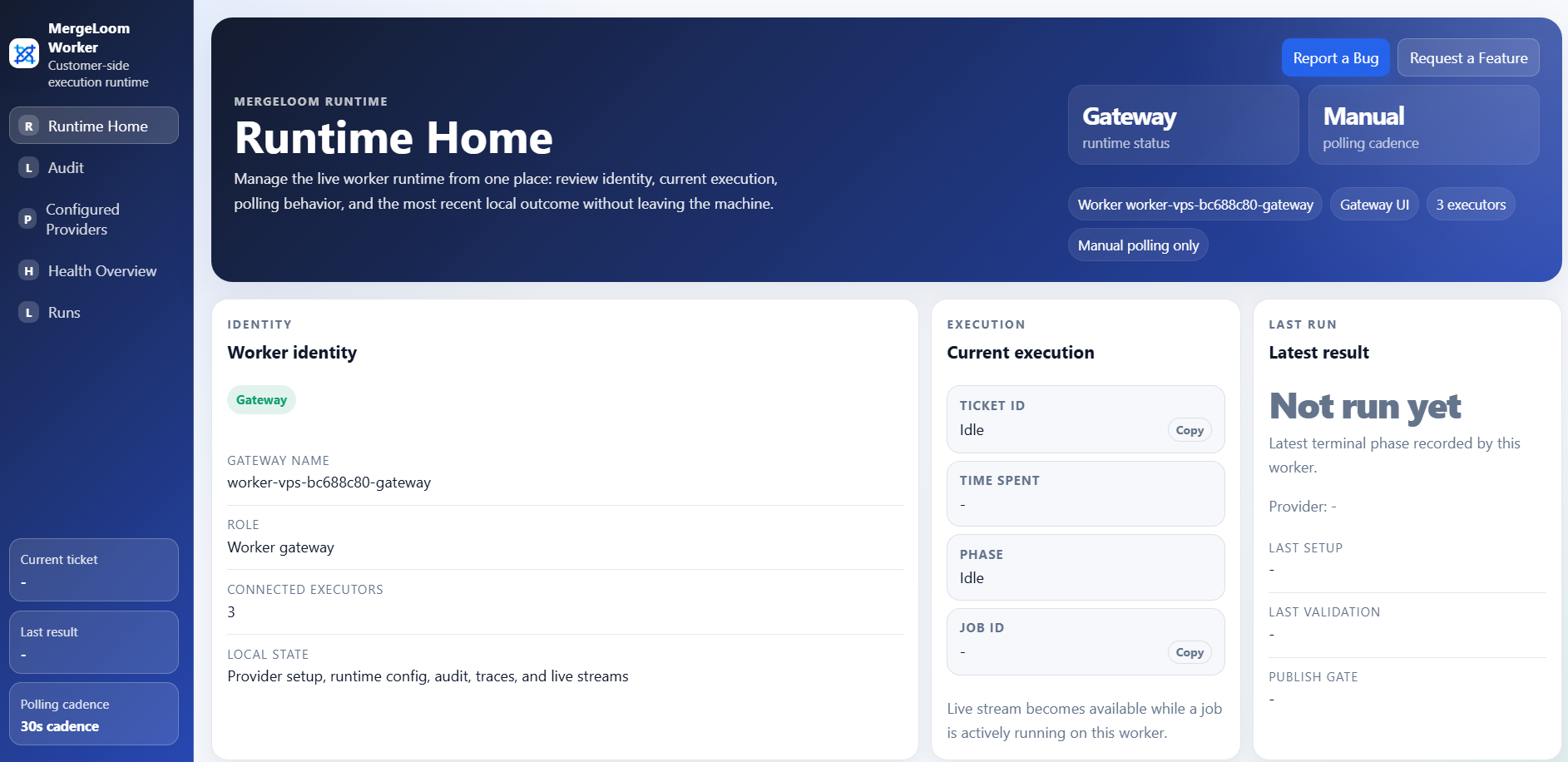
http://127.0.0.1:8010/, or tunnel that
port from your VPS, to confirm the gateway is running.
Important Worker Environment Values
Section titled “Important Worker Environment Values”The .env file includes:
JCA_WORKER_CONTROL_PLANE_URL=https://controller.mergeloom.aiJCA_WORKER_IMAGE=mergeloom/mergeloom:1.0JCA_WORKER_TENANT_SLUG=customer-slugJCA_WORKER_ENROLLMENT_TOKEN=replace-meJCA_WORKER_NAME=worker-customerJCA_WORKER_COUNT=1JCA_WORKER_UI_BASE_PORT=8010JCA_PROVIDER_CONFIG_MODE=uiJCA_WORKER_RUNTIME_CONFIG_MODE=uiJCA_WORKER_ALLOWED_COMMANDS=git,rg,pytest,python,python3,node,npm,npx,pnpm,yarn,uv,pip,poetry,bash,sh,go,cargo,dotnet,helmJCA_WORKER_MAX_REPAIR_ATTEMPTS=2Do not commit real .env values to source control.
Helm Install
Section titled “Helm Install”Install the public chart from Docker Hub OCI:
helm install mergeloom-worker oci://registry-1.docker.io/mergeloom/mergeloom-worker \ --version 1.0.4 \ --namespace mergeloom \ --create-namespace \ --set worker.controlPlaneUrl="https://controller.mergeloom.ai" \ --set worker.tenantSlug="customer-slug" \ --set worker.enrollmentToken="worker-enrollment-token"Use helm upgrade --install instead if you are updating an existing worker release.
For production installs, keep sensitive values in a Kubernetes Secret instead of Helm values:
kubectl create namespace mergeloom --dry-run=client -o yaml | kubectl apply -f -
kubectl create secret generic mergeloom-worker-env \  --namespace mergeloom \  --from-literal=JCA_WORKER_ENROLLMENT_TOKEN="worker-enrollment-token" \  --from-literal=JCA_OPENAI_API_KEY="openai-api-key"
helm install mergeloom-worker oci://registry-1.docker.io/mergeloom/mergeloom-worker \  --version 1.0.4 \  --namespace mergeloom \  --create-namespace \  --set worker.controlPlaneUrl="https://controller.mergeloom.ai" \  --set worker.tenantSlug="customer-slug" \  --set secret.existingSecretName="mergeloom-worker-env"
When secret.existingSecretName is set, the chart does not create its own
Secret. The gateway and executor pods consume the existing Secret with
envFrom.
Add only the keys your worker needs:
JCA_WORKER_ENROLLMENT_TOKENJCA_WORKER_CLUSTER_TOKENJCA_OPENAI_API_KEYJCA_ANTHROPIC_API_KEYJCA_VERTEX_SERVICE_ACCOUNT_JSONJCA_VERTEX_ACCESS_TOKENAWS_ACCESS_KEY_IDAWS_SECRET_ACCESS_KEYAWS_SESSION_TOKENJCA_AZURE_FOUNDRY_API_KEYAZURE_CLIENT_SECRETJCA_AZURE_FOUNDRY_BEARER_TOKEN
For Kubernetes cloud identity, prefer keyless identity where your platform supports it:
- Vertex AI on GKE: use
providerEnv.vertexAuthMethod: adcand a Kubernetes service account allowed by GKE Workload Identity Federation. - AWS Bedrock on EKS: use
providerEnv.bedrockAuthMethod: default_chainand an IAM role through IRSA. - Azure Foundry on AKS: use
providerEnv.azureFoundryAuthMethod: workload_identity, an AKS workload identity pod label, and the injected federated token file.
The chart source is public:
git clone https://github.com/MergeLoom/mergeloom-worker-helm-chart.gitcd mergeloom-worker-helm-chartValidate the chart locally before installing if your platform team wants to review it first:
helm lint .helm template mergeloom-worker . \ --set worker.controlPlaneUrl="https://controller.mergeloom.ai" \ --set worker.tenantSlug="customer-slug" \ --set worker.enrollmentToken="worker-enrollment-token"Helm Values to Review
Section titled “Helm Values to Review”Key values:
image:  repository: mergeloom/mergeloom  tag: "1.0"
gateway:  replicaCount: 1
executors:  replicaCount: 1
serviceAccount:  create: false  name: ""  annotations: {}
podLabels: {}podAnnotations: {}
worker:  controlPlaneUrl: "https://controller.mergeloom.ai"  tenantSlug: "demo"  enrollmentToken: ""  allowedCommands: "git,rg,pytest,python,python3,node,npm,npx,pnpm,yarn,uv,pip,poetry,bash,sh,go,cargo,dotnet,helm"  maxRepairAttempts: 2
secret:  existingSecretName: ""
providerEnv:  openaiApiKey: ""  openaiModel: ""  anthropicApiKey: ""  anthropicModel: ""  vertexAuthMethod: ""  vertexEndpointMode: ""  vertexProjectId: ""  vertexLocation: ""  vertexModel: ""  bedrockAuthMethod: ""  bedrockModelId: ""  azureFoundryAuthMethod: ""  azureFoundryModel: ""
The gateway runs provider and runtime configuration in UI-managed mode.
Executors read provider and runtime config from the gateway.
Scale executors.replicaCount when you want more worker capacity, subject to
your MergeLoom plan limits and repository/provider capacity.
providerEnv values are useful for quick tests, but sensitive values in
providerEnv are stored in Helm release metadata. For production, prefer
secret.existingSecretName. For cloud providers, prefer workload identity or
IAM roles over static keys when your Kubernetes platform supports them.
Verify the Worker
Section titled “Verify the Worker”Use the worker UI and logs.
Docker Compose:
docker compose psdocker compose logs -fdocker compose logs -f worker-gatewaydocker compose logs -f worker-executor-1Kubernetes:
kubectl get pods -n mergeloomkubectl logs -n mergeloom -l component=gateway -fkubectl logs -n mergeloom -l component=executor -fConfirm:
- worker gateway is reachable
- executor is registered
- provider config page loads
- controller enrollment succeeds
- no repeated authorization or polling errors appear