
What Is MergeLoom?
MergeLoom turns approved tickets, issues, and feature work into PRs or MRs with validation evidence using Cloud Hosted or Self Hosted AI coding execution.
At a high level:
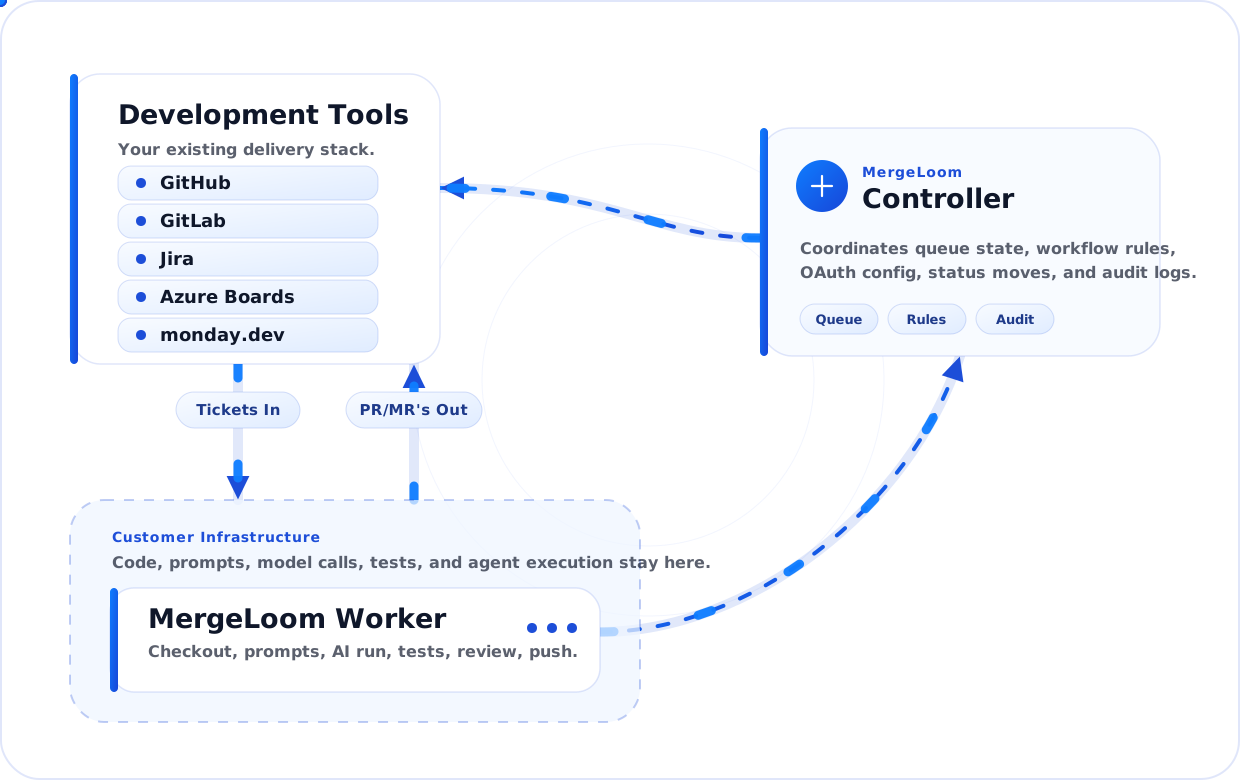
- the controller coordinates workspaces, integrations, workflow rules, job state, and review request creation
- Cloud Hosted runs on MergeLoom-managed cloud workers and uses Anthropic through MergeLoom with plan AI credits
- Self Hosted runs on your worker and performs checkout, context assembly, AI execution, validation, repair attempts, and branch push inside your environment
- your work tracker supplies the ticket or issue
- your code host receives the branch and PR or MR
- your AI provider path depends on the execution mode you choose
- Quality Agents score, investigate, validate, repair, review, and guard the run before review
Controller
Section titled “Controller”The MergeLoom controller at https://controller.mergeloom.ai is the coordination layer. It stores workspace configuration, integration state, repository catalog settings, workflow state mappings, execution-mode settings, self-hosted worker enrollment where used, job metadata, and review output coordination.
Use the customer controller for account access, integrations, repository catalog settings, workflow rules, execution mode, self-hosted worker enrollment, Cloud Hosted audit, and controller audit.
It is responsible for:
- connecting Jira, GitHub Issues, GitLab Issues, monday.dev, Linear, Azure Boards, GitHub, GitLab, and Azure Repos
- discovering eligible tickets or issues
- creating job records
- assigning jobs to the selected execution path
- creating or updating PRs and MRs after execution completes
- surfacing run state in the MergeLoom controller
Workflow and Quality Agents
Section titled “Workflow and Quality Agents”MergeLoom is built around a governed workflow, not a one-off prompt.
The run can include:
- Clarity Agent to block vague tickets before implementation
- Context Engine, where enabled, to assemble organization rules, repository guidance, linked docs, related service context, and ticket input
- Investigation Agent to produce a focused implementation brief
- Implementation Agent to write the change
- Validation Gate to run repository commands
- Repair Agent to fix bounded validation failures
- Review Agent to inspect the diff before humans see it
- Diff Guard to warn on risky or oversized changes
See Workflow and Quality Agents.
Execution Modes
Section titled “Execution Modes”Cloud Hosted is the fastest path. MergeLoom operates the hosted worker runtime, calls Anthropic through MergeLoom, and uses AI credits from your plan. Execution data, prompts, logs, traces, and audit records follow MergeLoom cloud cleanup and retention policy for your plan and workspace settings.
Self Hosted gives you the strongest infrastructure boundary. The worker runs in your environment and uses the provider path you approve.
Self Hosted Worker
Section titled “Self Hosted Worker”The worker is where the code work happens.
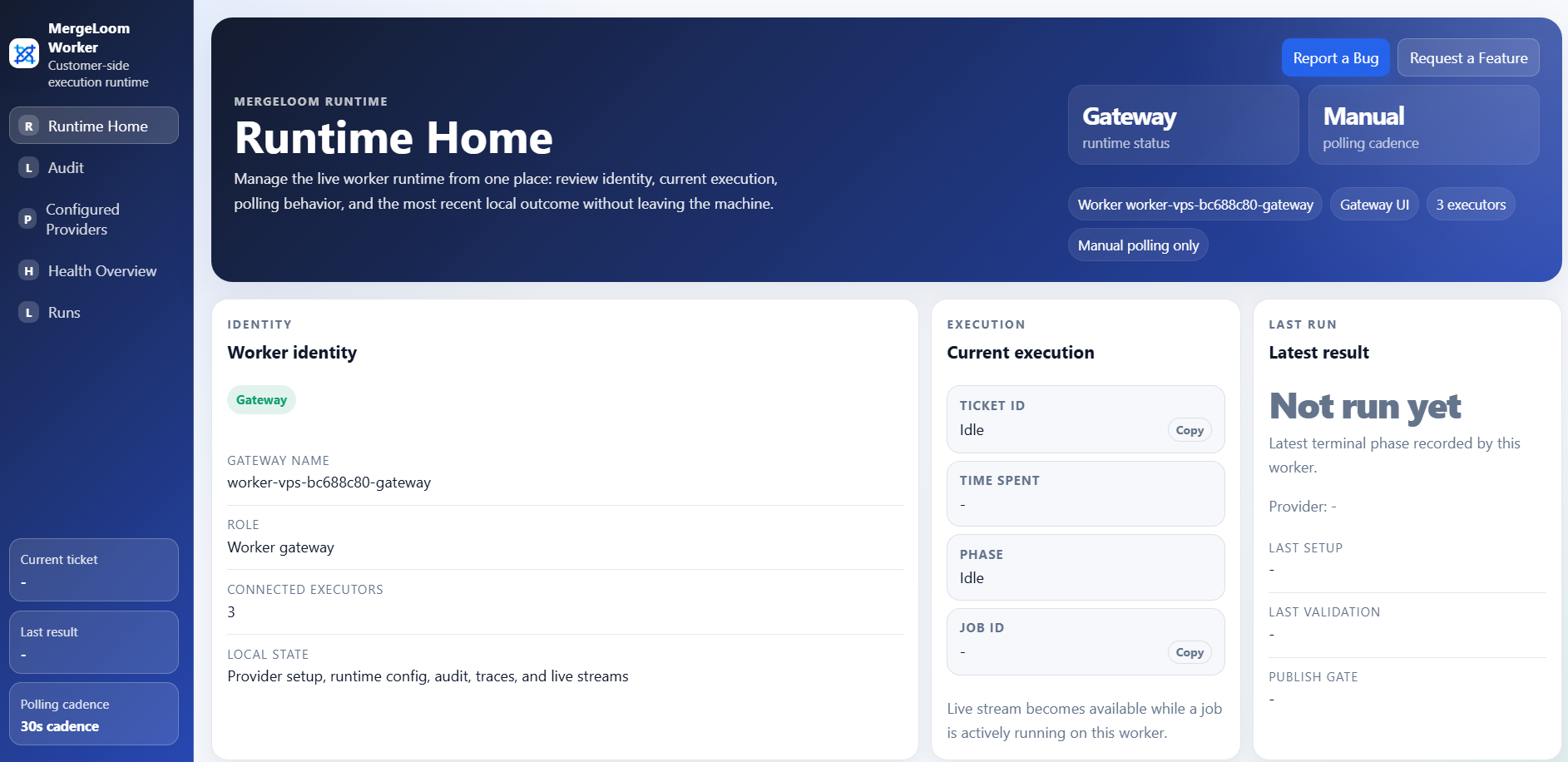
After installing the worker, open the local worker UI at
http://127.0.0.1:8010/. If the worker runs on a VPS, tunnel that port first
and then open the same local URL in your browser.
It is responsible for:
- checking out the repository
- assembling ticket context, organization context, repository rules, related service context, and validation instructions
- calling the configured AI provider
- running allowed commands and validation checks
- retrying bounded repair attempts when validation fails
- pushing the branch
- keeping local run history, provider readiness, and live stream state
What Is a Run?
Section titled “What Is a Run?”A run is one completed AI coding execution that produces a review outcome.
For billing and product language, think of a run as:
- one job assigned to the selected execution path
- one implementation attempt path for a ticket, issue, or manual job
- one PR or MR creation/update outcome when the job succeeds
If a run is blocked, denied, or fails validation, the run still creates useful trace information for review and troubleshooting.
What Stays on Your Infrastructure in Self Hosted?
Section titled “What Stays on Your Infrastructure in Self Hosted?”The worker performs the sensitive execution path:
- repository checkout
- context assembly
- AI execution path
- validation commands
- local run traces
- branch push preparation
Self Hosted is designed for teams that need the full code execution path inside their own boundary. Cloud Hosted is designed for teams that want MergeLoom to operate that path for them.
Where Audit Lives
Section titled “Where Audit Lives”Cloud Hosted audit lives in the customer controller.
Self Hosted Ticket Audit and Code Audit live in the local worker UI. The customer controller still shows controller-side intake, routing, and PR/MR coordination audit.
See Where to find audits.