
AI Coding Data Boundaries
MergeLoom supports two execution boundaries: Cloud Hosted and Self Hosted.
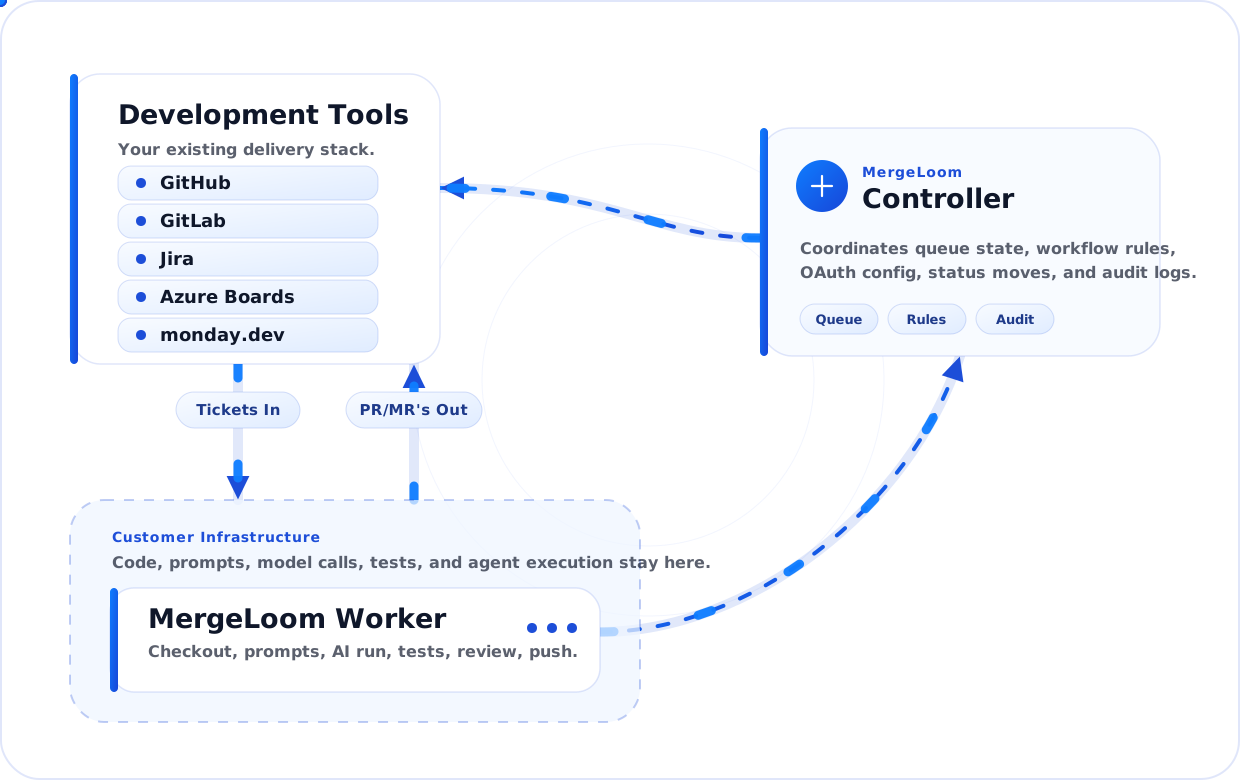
In Cloud Hosted, MergeLoom operates the cloud worker and Anthropic provider path. In Self Hosted, the customer worker handles the sensitive execution path. The controller coordinates the workflow in both modes.
Cloud Hosted Execution
Section titled “Cloud Hosted Execution”Cloud Hosted runs on MergeLoom-managed cloud workers.
Cloud Hosted currently uses Anthropic through MergeLoom. Customers buy and use AI credits through MergeLoom plans.
For Cloud Hosted:
- temporary execution data is cleaned according to MergeLoom cloud cleanup and retention policy
- prompts, logs, traces, and audit records are retained according to plan type and workspace settings
- Anthropic is the current AI provider path
- security, privacy, and procurement questions route through
support@mergeloom.ai
Cloud Hosted audit is shown in the customer controller. This includes Ticket Audit, Code Audit, Context Engine Audit where enabled, and Controller Audit tabs.
MergeLoom is working toward SOC 2 Type I and Type II audit readiness. Ask MergeLoom support for the current security materials during vendor review.
Self Hosted Worker-Side Execution
Section titled “Self Hosted Worker-Side Execution”The worker performs:
- repository checkout
- context assembly
- AI execution path
- command execution
- validation
- repair attempts
- branch preparation
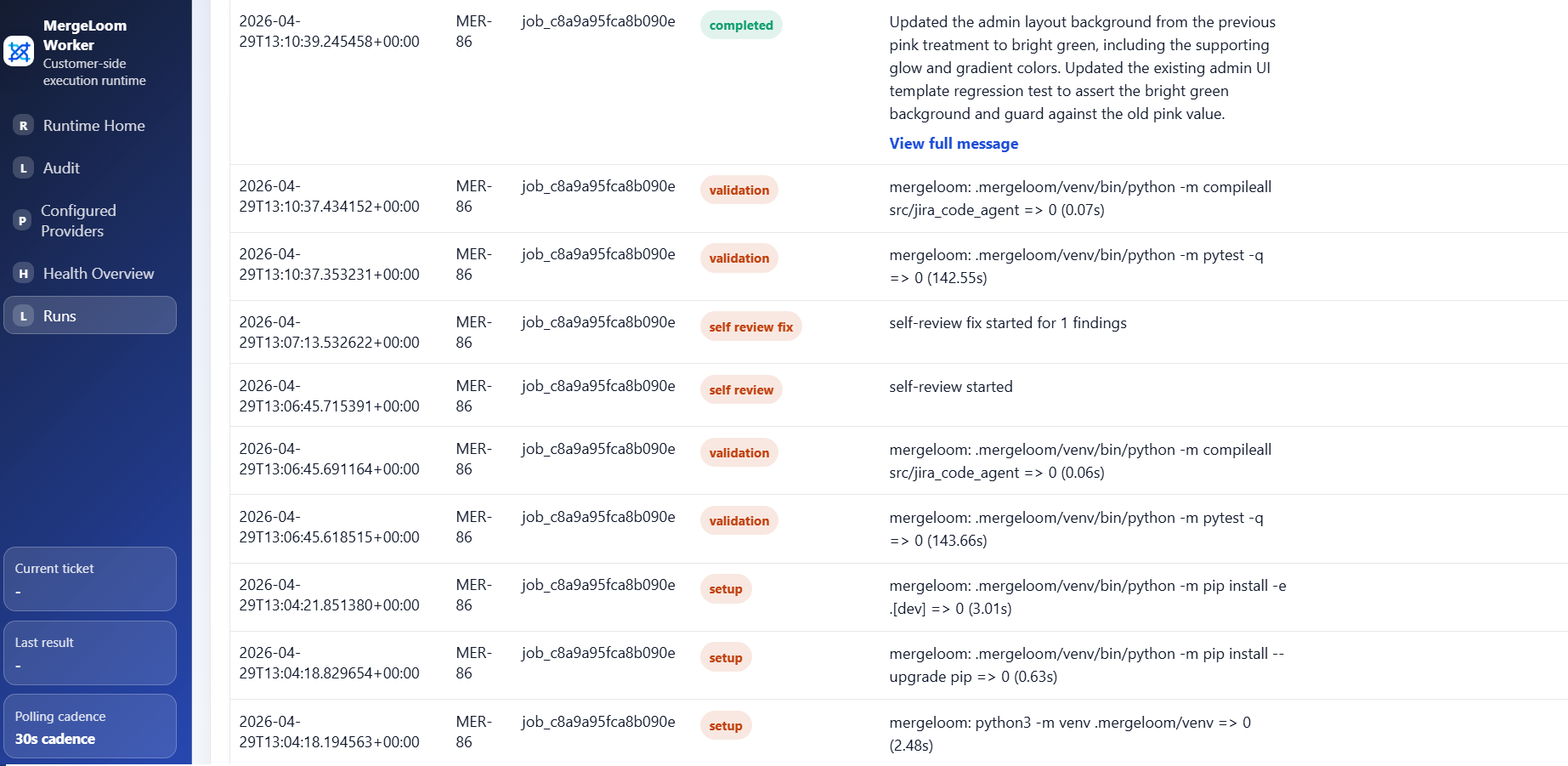
- local live streams and deeper run traces
This means the most sensitive operational activity happens inside your environment.
For Self Hosted, Ticket Audit and Code Audit evidence are worker-owned and shown in the local worker UI. The customer controller still shows controller-side intake, routing, and PR/MR coordination audit.
Controller Coordination
Section titled “Controller Coordination”The controller coordinates:
- workspace setup
- integration connection state
- repository catalog metadata
- workflow rules
- job records
- self-hosted worker enrollment where used
- review request creation/update coordination
- visible run state
The controller should not be treated as the place where repository execution happens.
Documentation Context Boundary
Section titled “Documentation Context Boundary”Repository guidance files such as MERGELOOM.md and AGENTS.md are read by
the selected execution path for the job.
Confluence context is a documentation-context integration. Configuration and selected sources live in the controller, while job-scoped context is supplied to the selected execution path for the run. Before adding restricted Confluence spaces, confirm the workspace’s Confluence retention and access policy with MergeLoom support.
For Self Hosted Context Engine usage, do not assume source-derived index payloads are sent to the controller as the primary store. Treat the local worker and its Context Engine storage as the sensitive boundary unless your deployment is configured differently.
Audit Data by Execution Mode
Section titled “Audit Data by Execution Mode”| Audit data | Cloud Hosted | Self Hosted |
|---|---|---|
| Controller intake and routing events | Customer controller | Customer controller |
| Ticket execution stages | Customer controller, Audit | Local worker UI /audit |
| Code line evidence | Customer controller, Audit, Code Audit | Local worker UI /audit/code |
| Live execution state | Customer controller, Cloud Runtime | Local worker UI home page |
| Deep worker traces | Retained cloud evidence and summaries where plan allows | Worker-owned local traces |
See Where to find audits for the current UI map.
Model Calls
Section titled “Model Calls”In Cloud Hosted, model calls are made to Anthropic through MergeLoom.
In Self Hosted, model calls are made from the customer worker path.
That matters because your provider choice and network policy can be aligned with your own infrastructure rules when you choose Self Hosted.
For Self Hosted, provider readiness and credentials are managed in the local worker UI, usually
http://127.0.0.1:8010/ after installation. If the worker is on a VPS, open
the worker UI through an SSH tunnel to port 8010.
Examples:
- use Codex CLI from the worker container
- use Claude Code CLI from the worker container
- point the worker at a private OpenAI-compatible endpoint
- use approved cloud provider endpoints from inside your network
What to Review with Security
Section titled “What to Review with Security”Before rollout, review:
- which execution mode you are using
- where the worker runs, if Self Hosted
- which repositories the worker can access
- which commands the worker can run
- which provider endpoint the worker can call
- which secrets are mounted into the worker
- who can change provider and runtime settings
- how long prompts, logs, traces, and audit records are retained
- how PR/MR output is approved
For Kubernetes installs, prefer secret.existingSecretName and a
cluster-managed Secret for enrollment tokens and provider API keys. Mount only
the keys the worker needs, such as JCA_WORKER_ENROLLMENT_TOKEN,
JCA_OPENAI_API_KEY, or provider-specific cloud credentials.
For cloud AI providers, prefer workload identity or IAM roles instead of static keys when possible. That means GKE Workload Identity Federation for Vertex AI, EKS IRSA or another AWS role source for Bedrock, and AKS Workload Identity or managed identity for Azure Foundry.
Practical Rollout Advice
Section titled “Practical Rollout Advice”For a first security review:
- Use a non-production repository.
- Choose Cloud Hosted or Self Hosted deliberately.
- Use one provider path.
- Use explicit allowed commands.
- Use clear validation commands.
- Keep human review required before merge.
- Confirm logs and traces contain what your reviewers need.