
Configure Ticket Intake and Workflow States
Workflow intake decides which tickets MergeLoom can pick up and how those tickets move through your existing workflow.
The goal is not to replace your project management process. The goal is to make the existing process explicit enough that MergeLoom can follow it.
This getting-started page covers the quick setup. For the full current workflow guide, see Workflow states and intake. For clarity scoring, investigation, repair, review, and diff guard settings, see Workflow and Quality Agents.
This Is in the Customer Controller
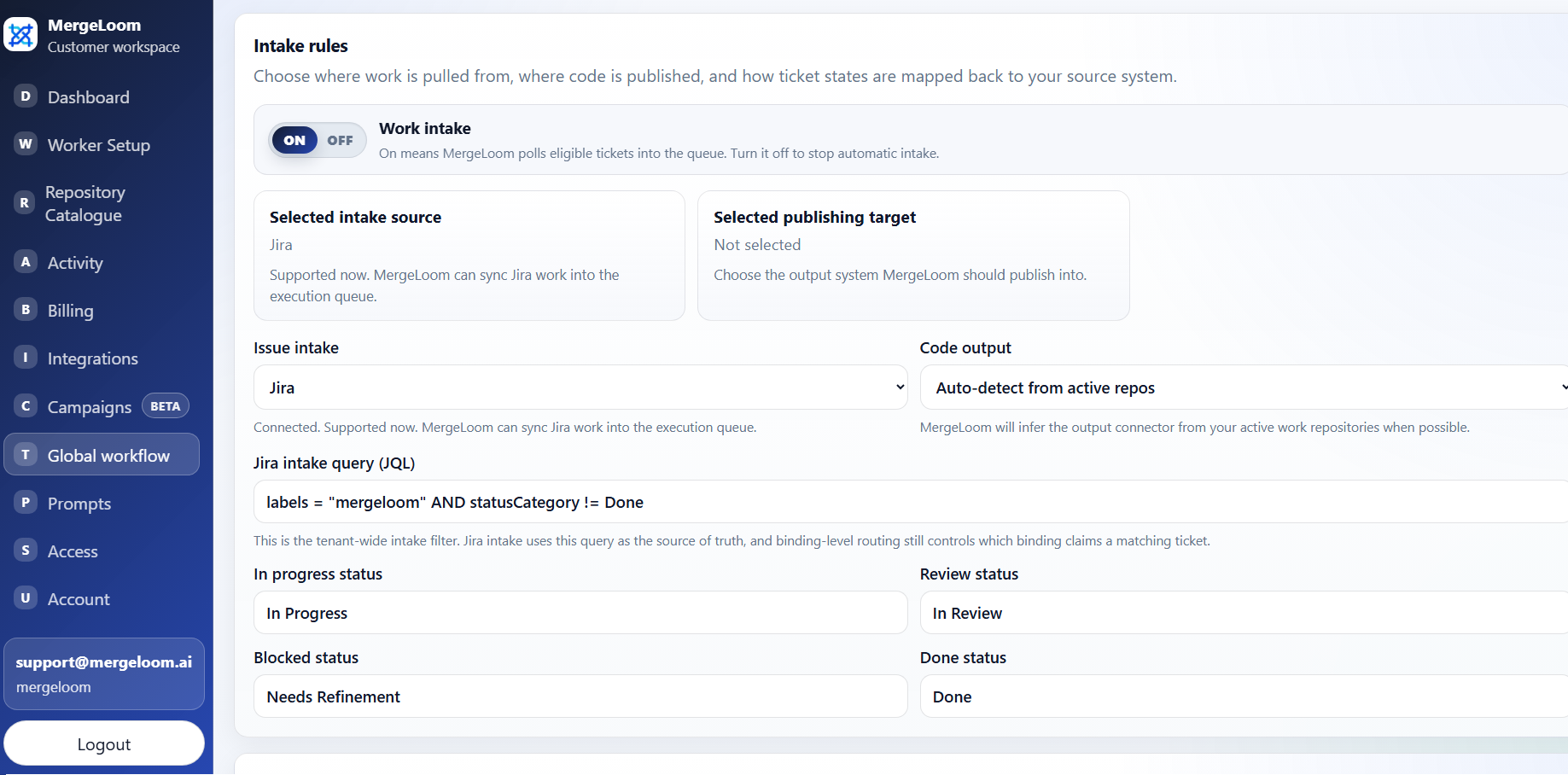
Configure intake source, output target, labels, and status mappings from
https://controller.mergeloom.ai. The local worker UI does not
own workflow state rules.
Intake Is Off by Default
New workspaces do not poll tickets automatically. Scheduled intake starts switched off, so you can connect integrations, sync repositories, confirm repository routing aliases, and choose Cloud Hosted or install a Self Hosted worker before MergeLoom picks up any work.
Turn Scheduled intake on from Global workflow settings only when the execution path, repository routing labels, and first test ticket are ready.
Core Concepts
Section titled “Core Concepts”| Setting | Meaning |
|---|---|
| Intake source | Where MergeLoom looks for ready work. |
| Code output | Where MergeLoom creates the PR or MR. |
| Managed intake label | The label or tag that marks work as eligible. |
| Ready state | The state that means a ticket can be picked up. |
| In progress state | The state MergeLoom can move work to when a run starts. |
| Review/testing state | The state MergeLoom can move work to when validation passes. |
| Blocked state | The state MergeLoom can use when a run cannot safely continue. |
The shipped managed intake label default is:
mergeloomKeep Scheduled intake off while you test the setup. MergeLoom will not automatically poll eligible tickets until you switch it on.
Jira Intake
Section titled “Jira Intake”Use Jira intake when your team manages work in Jira.
Example JQL:
project = MIR AND labels = "mergeloom" AND status = "To Do" ORDER BY updated ASCRecommended first-run pattern:
- add the
mergeloomlabel to one small issue - keep the issue in the ready state, usually
To Do - make sure the issue has enough context for an engineer to implement it
- route the issue to an enabled repository
monday.dev Intake
Section titled “monday.dev Intake”Use monday.dev intake when your team manages work in monday.com boards.
Configure:
- monday.com board IDs
- status column ID
- repository routing column ID if needed
- description column ID
- assignee column ID
- ready status label
- in-progress status label
- review/testing status label
- blocked status label
- done status label
Recommended first-run pattern:
- use one board
- use one ready status label
- make sure the item has enough description/context to implement
- route the item to an enabled repository
GitHub Issues and GitLab Issues Intake
Section titled “GitHub Issues and GitLab Issues Intake”For GitHub Issues or GitLab Issues, an eligible issue should usually:
- be open
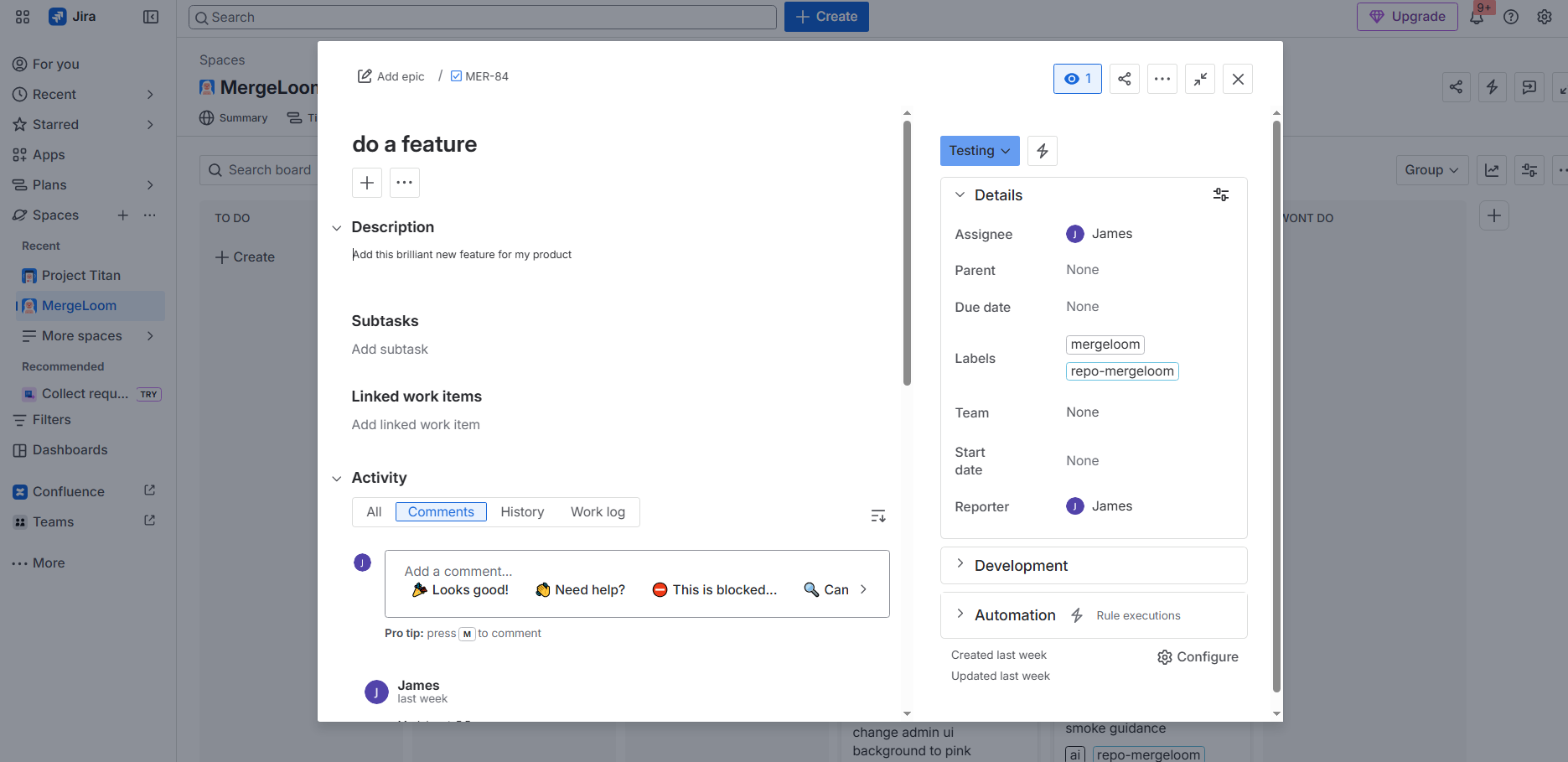
- have the managed intake label, usually
mergeloom - have a repository routing label such as
repo-serverif more than one work repository is enabled - be assigned to a MergeLoom workspace user
If intake is denied, MergeLoom leaves the issue in place, can post a denial comment, and records the denial in controller-side activity and audit surfaces. Pre-worker intake denials may never appear in Self Hosted worker runs because no worker started the job.
Azure Boards Intake
Section titled “Azure Boards Intake”For Azure Boards, configure:
- Azure DevOps organization
- Azure Boards project
- intake WIQL
- ready state
- in-progress state
- review/testing state
- blocked state
- done state
Default intake expects a work item to:
- have the
mergeloomtag - be in the configured ready state
- have a repository routing tag if multiple work repositories are enabled
- be assigned to a MergeLoom workspace user
Comments Are Part of the Workflow
Section titled “Comments Are Part of the Workflow”MergeLoom can use ticket comments as part of the next run.
For a continuation pass:
-
Add a comment that starts with one of these prefixes:
MergeLoom -MergeLoom:MergeLoom -> -
Put the new instruction in that same comment.
-
Move the ticket back to the configured ready state.
-
Let the scheduler pick it back up.
Current behavior:
- MergeLoom looks for a previous completed or blocked run with an actionable continuation comment
- MergeLoom resumes on the same branch when possible
- the next run receives the previous summary plus the new continuation instruction
- if a PR or MR already exists, MergeLoom updates the same review branch
Repository Routing Labels
Section titled “Repository Routing Labels”Use repository routing labels when a workspace has more than one enabled work repositories.
Open Repository catalog in the customer controller to see each repository alias. The alias is the label value you put on the ticket, issue, work item, or board item.
Example:
repo-serverrepo-webrepo-apiIn this example, the repository aliases are server, web, and api, so the labels are repo-server, repo-web, and repo-api.
If the repository alias changes in the catalog, the routing label changes with it. Update the ticket label to match the current alias before running intake.
For Jira campaigns from Epics:
- put
mergeloomon the Epic - put the default
repo-<alias>label on the Epic if all child issues use one repository - put child
repo-<alias>labels only when a child issue needs to override the Epic default
If a ticket has no matching repository route, MergeLoom leaves a comment on the ticket and records the failure in the controller activity log. Fix the repo-* label or repository catalog entry, then sync intake again.
Safe First Intake Setup
Section titled “Safe First Intake Setup”For the first live run:
- use one intake source
- use one code output provider
- enable one writable repository
- use one ready state
- use the default
mergeloomlabel - keep the ticket small and easy to review
- turn Scheduled intake on only after the worker and routing labels are ready
- leave the Clarity Agent enabled for the first run unless you are deliberately testing vague-ticket behavior